Duplicate Workflows & Questionnaires
Duplicate Workflows
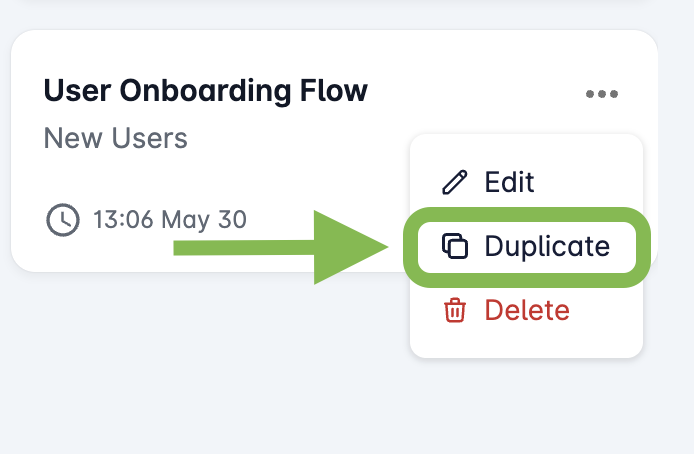
- The Duplicate option is easily accessible from the workflow management interface:
- In the Duplicate Workflow window, select the status of the duplicate workflow using the toggle switch.
You can choose betweenTestandLivemodes:
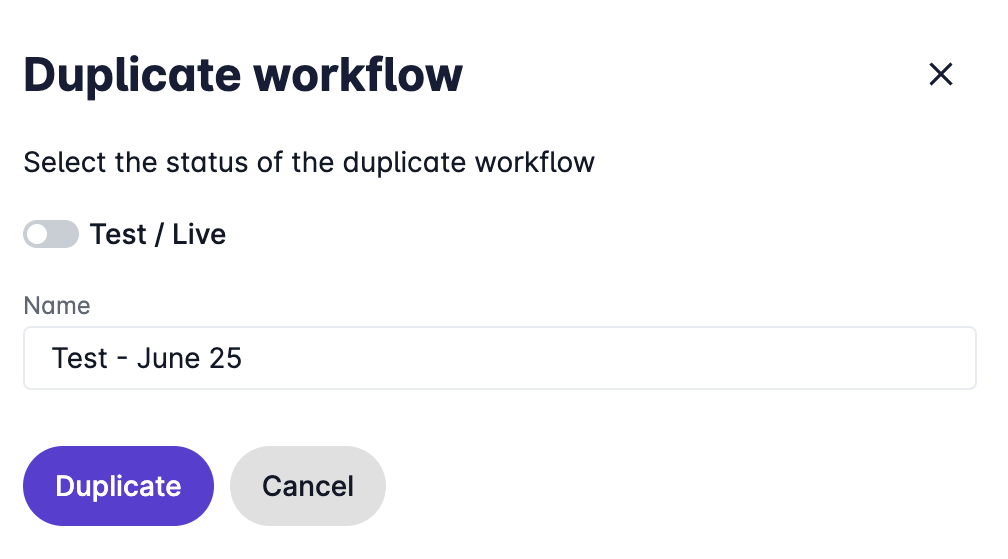
- This flexibility allows you to move workflows from the testing environment to the live environment seamlessly.
- Once duplicated, the new workflow will appear in your list of workflows with a name given while Duplicating.
- Click on the new workflow to edit and customize it as needed.
Duplicate Questionnaires
Questionnaires used in a workflow are automatically copied to Live together with the workflow. You do not need to duplicate them separately.
Once the workflow is copied, a notification will list the questionnaires that have been transferred.
info
If a questionnaire with the same name already exists in Live, the workflow will use the existing questionnaire instead of creating a new copy. Make sure its content is up to date before using the workflow in Live.
Manually Duplicating a Questionnaire
You can also duplicate a questionnaire separately:
- Go to Questionnaires.
- Find the questionnaire you want to copy and click Duplicate.
- Use the Test / Live toggle to select the target environment.
The duplicated questionnaire will become available in the selected environment.