Security Log
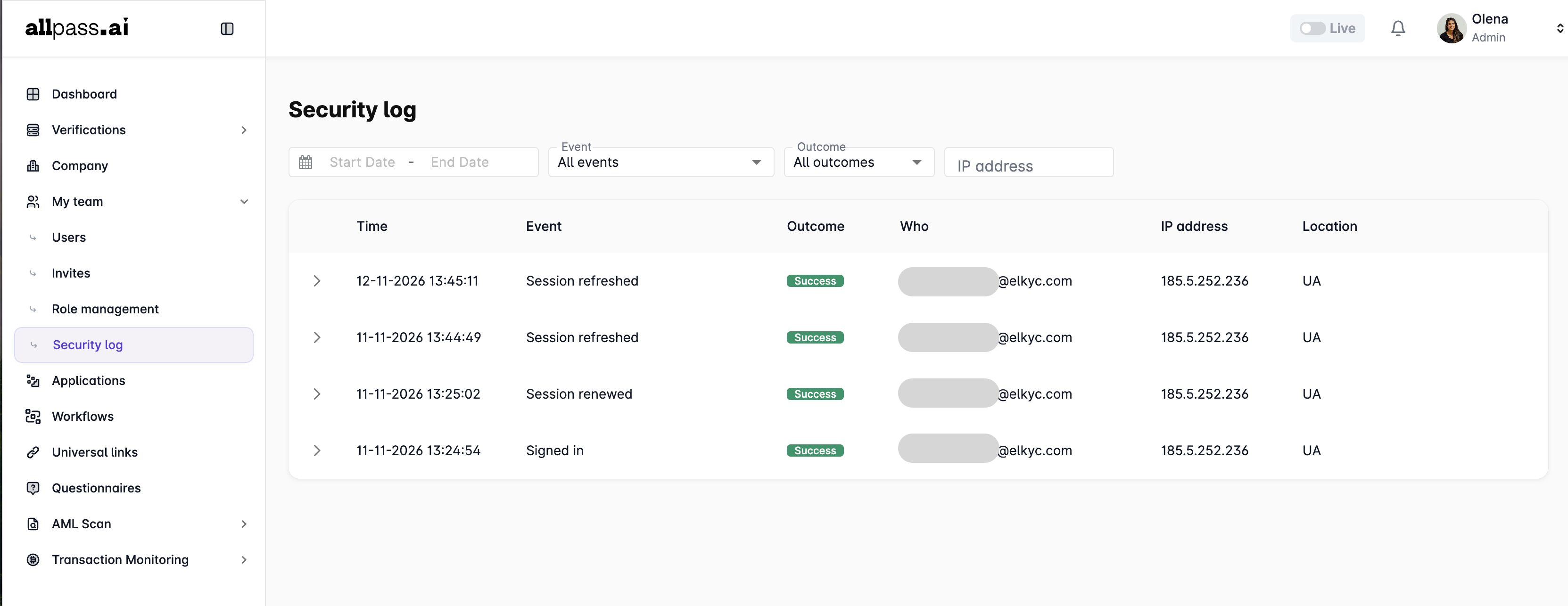
The Security Log page allows you to monitor account security-related activities and review the history of authentication and session events performed by users within Allpass.ai workplace.
To access the page, navigate to My Team → Security Log in the left-side menu.
To allow a user to view the Security Log, the respective permission must be granted to their role in Role Management → Team settings. If the option is not available in the user's menu, ask an administrator to check their role permissions.
Security Log Table
The main table displays a list of recorded security events with the following information:
- Time – The date and time when the event occurred.
- Event – The type of security-related activity (e.g., Signed in, Session renewed, Session refreshed).
- Outcome – The result of the event, such as Success or Failure.
- Who – The email address of the user who performed the action.
- IP address – The IP address from which the action was performed.
- Location – The country associated with the IP address.
Click the arrow next to an event to expand its details and view additional technical information.
Event Details
Expanded event records provide additional information that can help investigate suspicious activity or troubleshoot authentication issues:
- Time – The exact event timestamp, including milliseconds and time zone.
- User agent – Information about the browser, operating system, and device used.
- Request ID – A unique identifier for the request, useful for technical investigation and support.
- Session ID – The identifier of the user's session.
- IP address – The IP address associated with the event. You can copy it using the copy icon.
- User ID – The unique identifier of the user who performed the action.
- Country – The country associated with the IP address.
- Refresh Token ID – The identifier of the refresh token associated with the session.
Filters and Search
You can use the filters above the table to narrow down the displayed events:
- Date range – Select a start date and end date to view events within a specific period.
- Event – Filter records by event type or display all events.
- Outcome – Filter records by their result (e.g., Success or Failure).
- IP address – Search for events associated with a specific IP address.
When to Use the Security Log
We recommend reviewing the Security Log if you notice unusual account activity or suspect unauthorized access.
For example, you can:
- Check whether there have been unexpected sign-in attempts.
- Identify sessions initiated from unfamiliar IP addresses or locations.
- Review session renewals and refreshes.
- Collect technical details (Request ID, Session ID, User agent) for further investigation.
If you suspect that your account has been compromised, use Sign out from all devices in your My Profile settings to terminate all active sessions, and contact Allpass.ai support if you need further assistance.