Data confirmation
If the flow has the Audit archive step with the option Ask the applicant to confirm their data, and the applicant confirmed, the applicant's profile shows the Data confirmation block.
What the block shows
Open the applicant's profile and expand Data confirmation. The block is marked Part of Audit archive and shows:
Confirmed <date> UTC- when the applicant confirmed;Confirmed from- the city and country of the applicant;Confirmed data- a table of every item:Item,TypeandValue, which is the value the applicant entered, orFilefor a file. An item whose file was no longer in storage at the moment of confirming is markedMissing. When there was nothing to list: "The applicant had no data to confirm.";
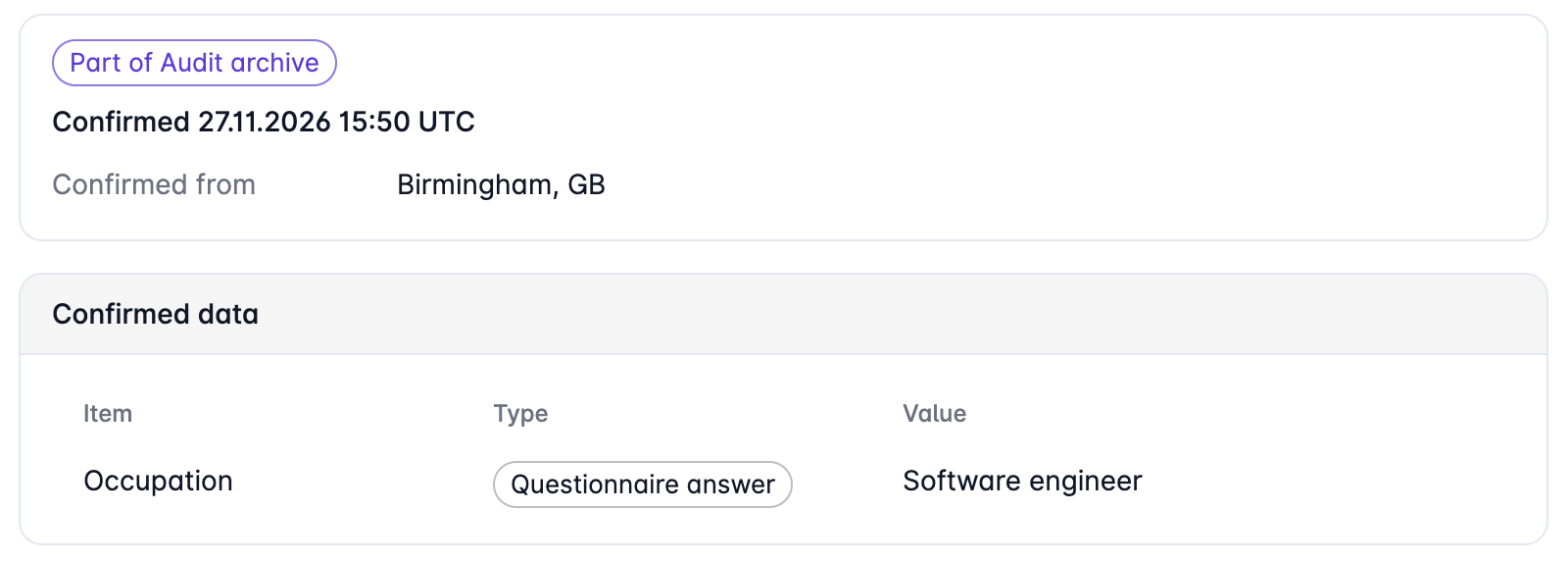
The confirmation text, the IP address, the device and the hashes are not shown here. They are in data-confirmation.pdf of the audit archive.
The same confirmation is sealed in the audit archive made by the flow as data-confirmation.pdf and summarised in its manifest.json (see Audit archives). The confirmation itself is not charged.
When the applicant confirms again
When a reviewer, or your system through the Public API, rolls back another applicant step, the confirmation is cancelled and the applicant confirms the data again after re-passing the step. Rollbacks made automatically, for example when a document expires, keep it. See When the confirmation is re-asked.
Each confirmation is written to the applicant's timeline: "Applicant confirmed their data (Audit archive)".
Through the API
In the applicant's servicesData the confirmation is the entry with service: "DATA_CONFIRMATION". It has only the fact, the time and the hashes, without the IP address, the text or the data:
"data": {
  "confirmationId": "3c1f9a52-7d0e-4b8a-9f3e-0c6a2d4b7e15",
  "confirmedAt": "2026-11-27T10:15:30.000Z",
  "dataSha256": "<hex>",
  "confirmationSha256": "<hex>"
}
See PublicDataConfirmationEntity in Entities.
Related
- Audit archive step - how to turn on the confirmation and what the applicant sees.
- E-signature - the applicant's signature of your documents.